Walks and workoutsFix a problem
If a walk was interrupted or didn't save
If Mova closes during a walk, nothing is lost. The next time you open Mova, it shows "Your walk was interrupted" and lets you resume, finish and save, or discard it.
What you’ll see
When you open Mova again, a card on Today (and in Workouts) says Your walk was interrupted, with the walk and how many minutes were recorded.
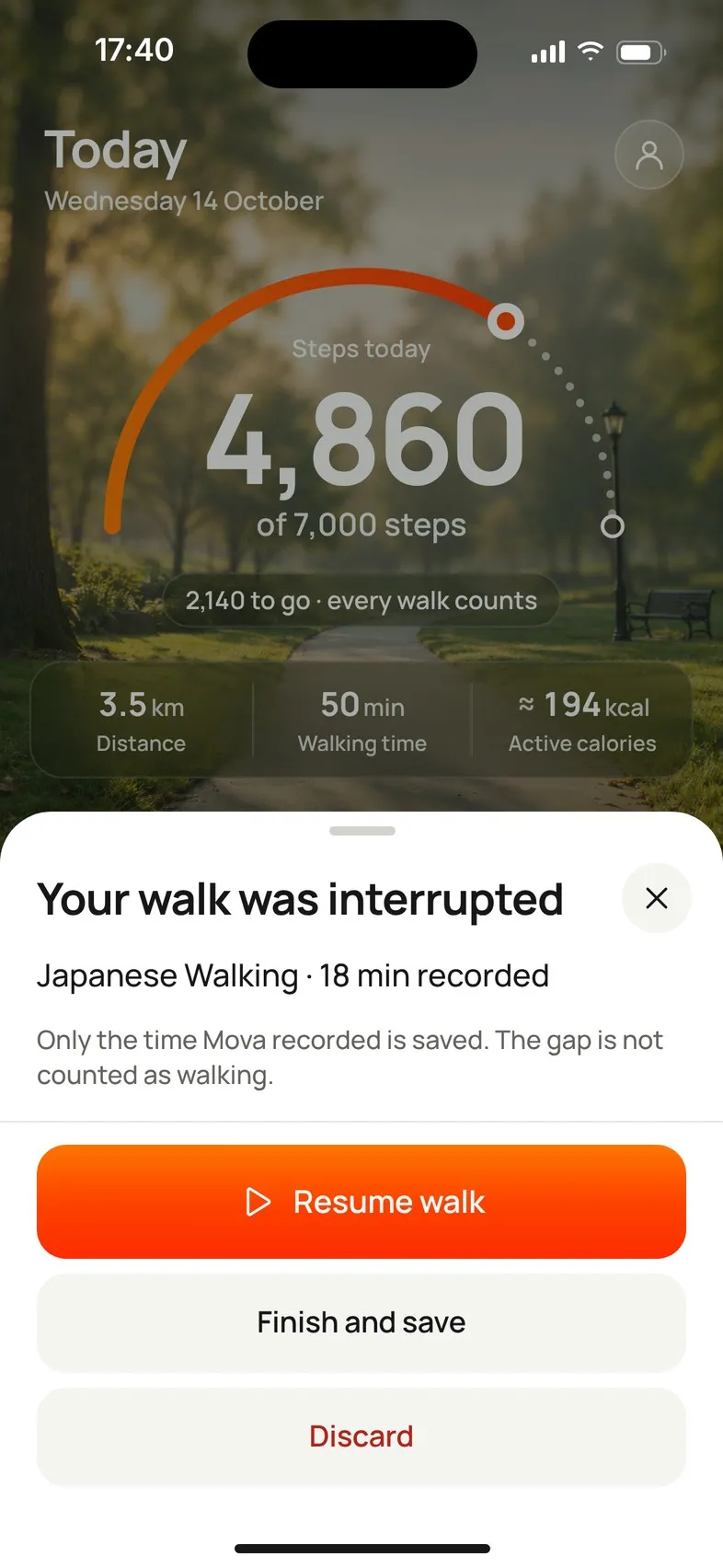
Choose what to do
| Button | What happens |
|---|---|
| Resume walk | Carries on where it stopped. |
| Finish and save | Saves the part that was recorded. |
| Discard | Throws the walk away. |
Only the time Mova recorded is saved. The gap is not counted as walking. The walk’s details later say Tracking paused while Mova was closed. Your everyday steps from Apple Health or Health Connect for that time still count toward your goal.
Mova never discards an interrupted walk by itself. It stays there until you choose, and you can’t start a new walk until you do (Start opens the interrupted walk first).
After 12 hours
A walk that’s more than 12 hours old can’t be resumed any more. You can still Finish and save or Discard it.
“Nothing Mova can save”
If the card shows the walk’s name followed by nothing Mova can save, the recording can’t be read. Tap Discard to clear it and start a new walk.
Indoor and chair workouts
These pause, rather than break, when Mova is closed or hidden. Open Mova and the workout is there, paused; resume it to continue.
Why it happens, and how to avoid it
A walk can be interrupted when the phone closes Mova in the background, for example when the battery is very low, or when the phone restarts. To help:
- Keep Mova running during the walk; don’t swipe it away.
- On outdoor walks, allow location while using Mova: Mova uses it to keep recording your walk while the screen is off.
- On Android, allow notifications for Mova (Android 13 and later): your walk then shows as Walk in progress in the notification shade while it records.
A walk that seems to be missing
If you didn’t see the summary after a walk, check Progress › Trends › All recorded walks: walks are saved as soon as they end. If Mova was still saving when it closed, it finishes saving the next time you open it. Still missing? Contact support with the date and time of the walk.
Didn’t solve it?
Email support@movawalk.com. From the app, Profile & settings › Help & support › Contact support adds your app version and support reference.