Walks and workoutsExplained
After your walk: your summary and saved walks
When a walk ends, Mova saves it and shows a summary. You'll find every walk later in Progress › Recorded walks. Walks can't be edited or deleted, apart from a treadmill walk's distance.
Your walk summary
As soon as a walk ends, it’s saved and Mova shows the summary:
- Walk complete when you walked to the planned end, or Walk saved when you finished early (and always for a Free Walk).
- The walk, the date and time, and your active time.
- How it fits your plan: Completed from your Plan, Saved — part of today’s session, or Also counted toward today’s …. In a Program: Session 3 of 12 (for example) or Final session of ….
- Distance, Avg pace, Steps and Active cal. (an estimate). If something wasn’t recorded, Mova says so, for example Only time and steps were recorded.
- The phases you walked, for example 3 of 5 rounds.
- Your route map, or why there isn’t one.
- Whether it was saved to Apple Health or Health Connect.
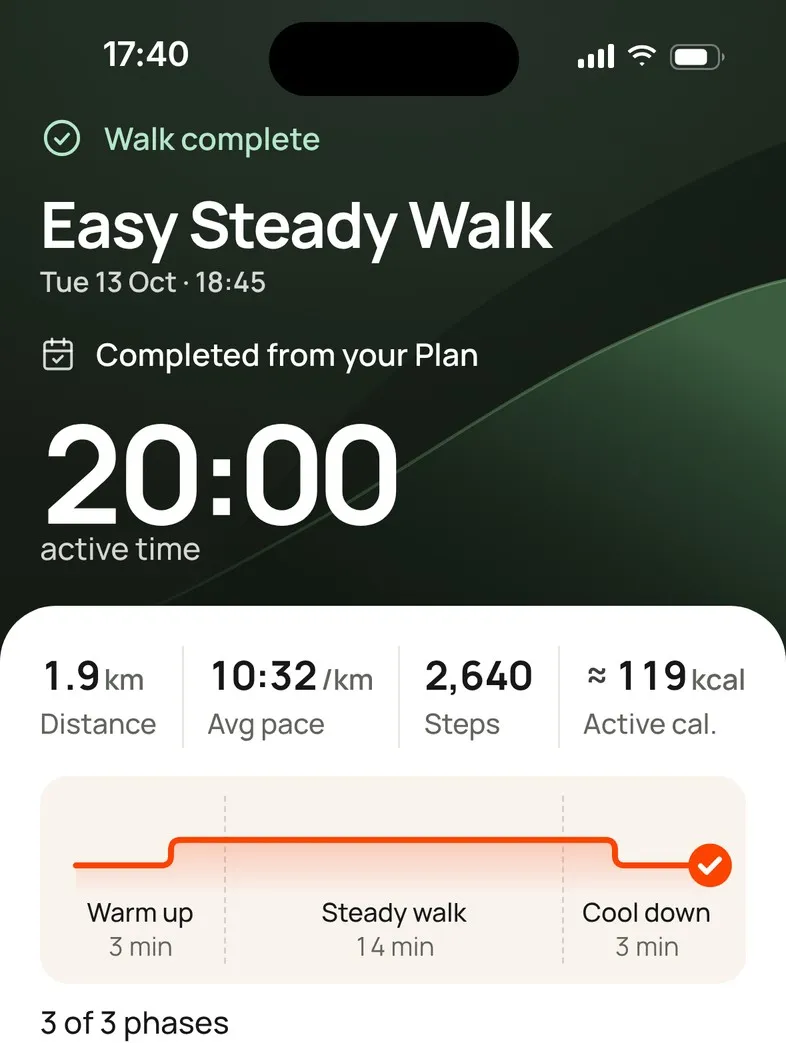
Tap Done to go back to Today. After the last session of a Program the button says Continue and shows Program complete.
Find a walk later
- Progress › Trends, then All recorded walks under Recorded walks. Walks are grouped by week.
- Progress › Overview, tap a day, then the walk.
Tap a walk to see its details: everything from the summary, plus Started and Finished, the Where, and Tracking paused while Mova was closed if Mova was closed for part of it. Distance shows where it came from: GPS, Entered from treadmill or Not recorded.
Warm-ups and stretches aren’t listed as walks.
Can I edit or delete a walk?
No. Once saved, a walk can’t be edited or deleted in Mova. The one exception is a treadmill walk’s distance, which you can add, change or remove: see Treadmill walks.
If you didn’t mean to save a walk, you can discard it before saving: tap Stop, then Discard walk. To remove all your data, you can delete your account.
Messages you might see
- This walk isn’t available · It may have been removed on another device.
- Couldn’t save to Health · Mova will retry: the walk is saved in Mova; Mova tries Health again later.
- Route maps stay on the phone that recorded them: you’re looking at a walk from another phone.
Didn’t solve it?
Email support@movawalk.com. From the app, Profile & settings › Help & support › Contact support adds your app version and support reference.